Names – married name in death sentences #names #alternatenames #death

RootsMagic 7 offers no means of using an Alternate Name value in its sentence template language for events for any fact type other than Alternate Name. Some users want to use a wife’s married name (husband’s surname) for her events after Marriage, especially the end-of-life events as the married name is commonly recorded or engraved on headstones. Within RootsMagic, the only workarounds are to:

  1. customize each event sentence to incorporate the husband’s surname literally, not as a field,
    or
  2. share the event with the husband which then enables retrieval of the husband’s name in a custom default sentence.

Either way is labour intensive.

This script carries out the first workaround in a matter of seconds, applying a custom local sentence to each of the end-of-life events for a wife having a valid Marriage event. It does not touch the events of a person with no Marriage event nor one with a subsequent Annulment or Divorce event. A polygamist woman would take the name of the last groom. It ignores Alternate Names but perhaps that is a possible enhancement that would be desirable to accommodate name hybrids such as maidenname-husbandname.

Name-Married_in_DeathSentence.sql

SpouseID Invalid #spouse #error #family

Update 2021-03-11: scripts work on #RM8.

This page stems from weird behaviour that surfaced in a database that suffered from the initial direct TMG import by RM 6.2.3 which created a single parent family for each child (see discussion – link broken in migration from Wikispaces). After running the script Merge Duplicate Single Parent Couples, inspection of the results encountered an empty Family View when going to certain persons selected in RM Explorer or navigating to them through Family View. What was then discovered was that the SpouseID in the PersonTable was invalid – there was no such couple in the FamilyTable. Setting the SpouseID to 0 cleared the empty Family View symptom.

The PersonTable.SpouseID value directs which spouse would be displayed in the Main View when one, other than some default, was selected. Its name is somewhat misleading because it contains the FamilyID in which the selected spouse is tied to the focus person, not the RIN of the spouse. In the case reported above, there were multiple FamilyIDs for a person each with a spouse of RIN 0 and all but one were deleted by the Merge process. The SpouseID could then be left pointing to a now-non-existent FamilyID, resulting in a blank or empty Family View.

Check for Invalid SpouseIDs

This script is useful for examining the behaviour of SpouseIDs as spouse selection or navigation is executed in RootsMagic.
SpouseID_Invalid-Check.sql

Reset Invalid SpouseIDs

This script resets the invalid SpouseIDs reported by the above script to 0.
SpouseID_Invalid-Reset.sql

Births – Add from Christening or Baptism #birth #events

2026-08-05 Updated for RM11

This Gemini generated script updates from the RM7 version below with the added features that the RM People View gets the column Date Last Edited updated for the affected persons and the BirthYear in various displays is set. Also, instead of the ‘Before’ prefix being added to the Date and SortDate, the ‘By’ prefix as was suggested in a Comment is applied.

Birth-AddFromChristenBaptism_RM11_ByDate

The procedure with Gemini started with a rather simple prompt that included the original script, requesting it to check for compatibility with RootsMagic 11, update it accordingly, and to propose any improvement in the code. The first response was excellent, collapsing the script from multiple statements into a single, efficient query. However, Gemini hallucinated that the FactTypeID for Baptism (7) had been swapped with that for Burial (4) after RM7. Subsequently, as I added the updating for Date Last Edited and BirthYear displays in RM11, Gemini added additional statements, a temporary table and enclosed the set in a transaction.


RootsMagic 7, as does some other software, uses the date of the Christen event as a substitute birth date for age calculations and summary displays when there is no Birth event. But RootsMagic’s own mobile application for iOS and Android does not. Moreover, some users object to using the Christen fact type, on principle or perhaps having already extensively used the Baptism fact type and not wanting to have to change those instances one at a time, just to get the benefit of the auto-substitution. If that is all that is wanted, then the script Facts – Change Fact Type should suffice. This script removes the reliance on auto-substitution by creating a Birth event from the Christen or Baptism event for all persons having one or more of those but no Birth event.

Birth-AddFromChristenBaptism.sql

-- Birth-AddFromChristenBaptism.sql
/* 2017-02-11 Tom Holden ve3meo
For persons having no Birth event but with either a Christen
or Baptism event, adds a Birth event duplicating the CHR or BAPM
event.
 
It does not copy citations or media and does not modify
the Date or SortDate. If a person has both CHR and BAPM, it
copies CHR. If a person has multiple CHR or BAPM events,
it copies only one which with priority given to IsPrimary
and secondly to lowest SortDate.
*/

…and it does not replicate sharers if the source event is shared.

Problem Adding Entries to MediaLinkTable #media #views #citations #sources

I don’t usually post a page here requesting help, but I’ll make an exception in this case. I have created a query that adds rows to the MediaLinkTable. The purpose of the added rows has to do with the fact that I’m an extreme source splitter and therefore I link media files to RM’s Master Sources and not to RM’s Source Details. I now find that because of the way I would like my data to appear in a new product called GedSite, it would be convenient for the same media files to be linked to all the Source Details associated with each Master Source.

It seems like a query that’s simple enough. After running the query, the MediaLinkTable looks perfect from SQLiteSpy. After running the query, the data look perfect from the RM user interface. After running the query, the data looks perfect in GEDCOM I export for use with GedSite. And after running the query, the data looks perfect in GedSite (well, not quite perfect – there is some duplication of some of the data, but that’s acknowledged to be a bug in GedSite and not a problem in the GEDCOM). So what’s the problem? After running the query, I’m no longer able to tag any media files in RM to any kind of object to which media files can be tagged.

When I say that after running the query that the data looks perfect in the RM user interface, I mean the following. There are several ways to look at RM’s media tags, and for example you can do it from the Media Gallery. If you highlight a particular media item, you see all the tags in a panel on the right side of the screen. Tags to Master Sources manifest in the list as tags to “sources” and tags to Source Details manifest in the list as tags to “citations”. After running the query, all the tags are there, both the tags to “sources” that were there before running the query and tags to “citations” that were added by the query.

A minor glitch that I don’t think has anything to do with anything is that the MediaLinkTable is an indexed table, and you have to run RM’s File->Database tools->Rebuild Indexes tool to rebuild the indexes after running the query, but I have done so.

The symptom when trying to add new media tags from the RM user interface is that doing so initially looks like it has worked, but then what appears to be the newly added tag hasn’t been added after all. There is no error message. This is a wild shot in the dark, but I have the sense that my query needs to do something to “close out” or “commit” what it has done, and I’m probably missing something obvious. So any advice would be most appreciated. The text of my query follows. The rather curious looking condition AND S.Name LIKE(‘*%’) is because all my extremely split sources have a name that starts with an * and all my older lumped sources have a name that doesn’t start with an *. I only want to apply this query to the extremely split sources. The condition ON ML.OwnerType = 3 serves to select only existing media links to Master Sources because those are the ones I want to replicate as links to Source Details.

Jerry

P.S. This query needs to do an update on a JOIN and SQLite does not support doing an update on a JOIN, or at least not directly. You can still do an update on a JOIN in SQLite by hiding the JOIN in a sub-query or by hiding the JOIN in a view. I have hidden the JOIN (several of them, actually) in a view.


----------------------
-- Create media links for all citations whose master sources have media links,
-- making the media links for the citations match the media links for the master sources.
DROP VIEW IF EXISTS CitationsNeedingMedia;
CREATE TEMP VIEW CitationsNeedingMedia AS
SELECT C.CitationID AS OwnerID, S.SourceID, S.Name, ML.MediaID, M.MediaFile, 4 as OwnerType,
       ML.IsPrimary, ML.Include1, ML.Include2, ML.Include3, ML.Include4,
       ML.SortOrder, ML.RectLeft, ML.RectTop, ML.RectRight, ML.RectBottom, ML.Note,
       ML.Caption, ML.RefNumber, ML.Date, ML.SortDate, ML.Description
FROM CitationTable AS C
          JOIN
     SourceTable AS S ON C.SourceID = S.SourceID AND S.Name LIKE('*%')
        JOIN
     MediaLinktable AS ML ON ML.OwnerType = 3 AND ML.OwnerID = S.SourceID
        JOIN
     MultimediaTable AS M ON ML.MediaID = M.MediaID
ORDER BY S.Name, C.CitationID;
 
INSERT OR ROLLBACK INTO MediaLinkTable (MediaID, OwnerType, OwnerID,  -- These are the "new" items. In particular
                                                                      -- OwnerType must be 4 and OwnerID must be the CitationID
                                        IsPrimary, Include1, Include2, Include3, Include4,
                                        SortOrder, RectLeft, RectTop, RectRight, RectBottom, Note,
                                        Caption, RefNumber, Date, SortDate,Description)
SELECT MediaID, OwnerType, OwnerID,
       IsPrimary, Include1,  Include2, Include3,  Include4,
       SortOrder, RectLeft,  RectTop,  RectRight, RectBottom, Note,
       Caption,   RefNumber, Date,     SortDate,  Description
FROM CitationsNeedingMedia;

Discussions & comments from Wikispaces site

ve3meo

RootsMagic needs to close and reopen the database

ve3meo
06 February 2017 22:11:05

I see the same behaviour, Jerry. Closing and reopening RootsMagic clears the blockage; I expect it is simply a matter of closing and reopening the database. RM must set some internal counter or pointer on one of the affected tables to its last rowid and when it tries to append a record at that pointer + 1, it hits a SQLite error which it does not report. Your script has already created a row at that point and it has to be unique.

Tom


thejerrybryan

thejerrybryan
07 February 2017 03:21:04

Thanks. I guess I thought I had already tried the close and open RM trick, but I’ll try it again. In the meantime, here is a question – is this an issue you have encountered before? Which is to say is the same thing likely to happen with any script that adds rows to a table? Most of my queries have been just reports not updates. And my few updates have usually updated a row in place rather than adding new rows. So this is sort of new territory for me.

Jerry

Names – Delete Duplicate Alternate Names of Type ‘Married’ #alternatenames #names #duplicates

A member of the RootsMagic-Users Facebook Group posted this question:


=====Ted Duffy=====
February 3 at 11:04am


I just imported my Legacy Family Tree database into RM7. Many of my female ancestors now have exact duplicate Alt Name Facts in RM7. Is there a way to bulk delete these duplicates?

Of course, the answer is not in the tool-set RootsMagic 7 provides. But SQLite can come to the rescue. Here’s a pretty short script that should do the job. Be warned that it looks for exactly duplicated name fields (all name fields), not just similar ones. And it only operates on ‘Married’ Alternate Names.

Be sure to test on a copy of your database or make a backup just prior to running the script.
Names-AltMarriedDupeDelete.sql

WebTags – convert to Notes et al #webtags #gedcom

Intro

WebTags, introduced in RootsMagic 6, are not successfully exported to 3rd party software. One wish is for an export option that would append WebTags to the Note or Comment for the related entity which are supported by GEDCOM 5.5. Until that happens, this special SQLite3 query offers a potential workaround and a possible model for a future RM feature.

Conditions

RM6/7 offer the WebTag feature for Persons, Sources, Citations, Places and Research Log items. The first three entities are supported in standard GEDCOM; the last two require custom GEDCOM which is largely incompatible with other software so there is no point in attempting to convert their WebTags. Person Notes, Source Comments and Citation Comments are GEDCOM compatible so that is where we will append the WebTags.

Because there can be multiple WebTags for a given entity, I could not come up with a procedure that appended all its WebTags with a single command. Instead, this script is to be executed repeatedly until the temporary tables it creates are all empty.

Screenshots

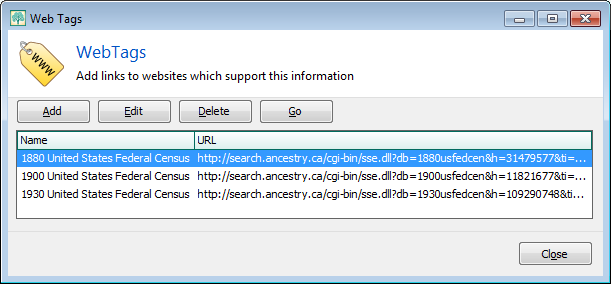
WebTagsWindow.PNG
List of WebTags for Hiram Decker-321
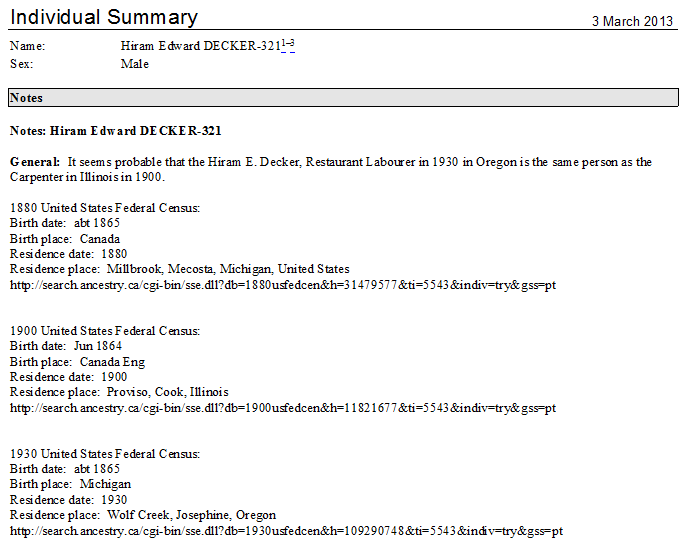
WebTagsToNotesWithoutPrivateParts.PNG
Individual Report showing the content from WebTags appended to the Personal Note. Private notes excluded.
WebTagsToNotesWithPrivateParts.PNG
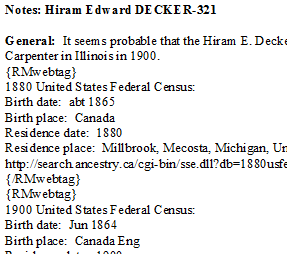
Extract from Individual Report with Private Notes included, thus showing the {RMwebtag}{/RMwebtag} pair demarking each WebTag.

Download

WebTags_to_Notes.sql Rev 2016-11-20

Future of SQLite Tools for RootsMagic wiki 2016-17

Wikispaces terminated free subscriptions for non-education wikis on Oct 15, 2014 and commenced charging US$50 p.a. for ongoing service. As of Nov 12, 2016, our fee jumps 100% to US$100 p.a. There is no apparent (to me, at least) free or cheaper alternative to which this wiki can be readily migrated. So, once again, I launched an appeal on 14 Sep 2016 for your financial support to keep it going. Within 12 hours the $200 target was exceeded! A message was sent to all members announcing the termination of the campaign and, soon thereafter, the donation button was disabled and then removed.

On Oct 29, I committed as much of the funds as I could to extend the subscription to Jan 11, 2019.

Thank you, donors!
Tom


Source Citation Sort #sources #citations

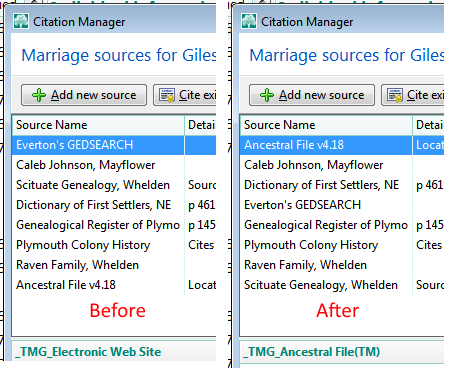
A longstanding wish is for RootsMagic to list sources alphabetically in the Citation Manager rather than in the order they were cited for the particular fact. This would seem to be a fairly trivial programming change but as of RootsMagic 7, it has yet to be delivered. Here is a script that accomplishes the same ends by brute force – a complete reordering of the records in the CitationTable. Of course, that requires revising all other tables that point to it.
CitationSort.png
This first script is not essential to getting the Citation Manager sorted but does make inspection of the data tables a little easier. It reorders the rows in the SourceTable (the Master Sources) alphabetically by name. It requires a fake RMNOCASE collation extension and you should run RootsMagic File>Database tools>Rebuild Indexes on the database when you return to work on it. SourcesSort.sql

This script does the job for Citation Manager. It, too, requires the SQLite manager to have a fake RMNOCASE collation but should not cause a failure in the RootsMagic Integrity Check nor require its Rebuild Indexes. CitationSort.sql

Both were developed using SQLiteSpy.

I have not tested extensively so be sure to make a backup or work on a copy of your database and check that there are no unwanted consequences before committing to it as your ongoing file.

N.B. CitationSort.sql needs revision so that it will not disconnect or cross-connect Ancestry Sources linked by TreeShare in RootsMagic 7.5+. It can be used on databases that are not connected by TreeShare. There may be a similar issue for sources linked with FamilySearch through RootsMagic’s FamilySearch Central.

COPY FamilySearchID to REFN fact #refno #FamilySearch

Update 2023-11-22: #RM9 version

Problem Description

This script responds to a user’s problem posted on FaceBook: she had two databases with overlapping people in them. One was her master with people matched to FamilySearch; the other was developed independently using FamilySearch. Because the duplicated people were created independently, she cannot rely on the RootsMagic File>Compare Files tool to unambiguously pair them based on a common UID (RootsMagic’s hidden Universal Identification) because their UID’s are different. But they have been matched to the same FamilySearch persons and thus have the FamilySearch ID (FSID) in common. Unfortunately, Compare Files does not a high match make for duplicate FSIDs. That seems to be a shortcoming that should be addressed.

Duplicate Search Merge has two options:

  1. Find people with the same Ancestral File numbers (ignore all other information)”
  2. “Find people with the same reference numbers (ignore all other information)”

Wouldn’t it be nice if there was another option:

  • “Find people with the same FamilySearch ID (ignore all other information)”

Absent that third option, the user figured that if she could get the FSID into a Reference Number (Ref#) fact for each person, the databases could be combined and DSM with option 2 would reliably pair up the duplicate people. This should also be useful when people matched to FamilySearch get duplicated in a database through other avenues such as overlapping downloads from FamilySearch into the same database.

Getting the FSID into a Ref# fact is a laborious task if there are more than a few people to do. Moreover, it is complicated if the people have pre-existing Ref# facts for other purposes that must be preserved. Duplicate Search Merge compares only the first Ref# fact for a person to the first Ref# fact for each other person. Thus it requires this FSID Ref# fact to be the lowest record number of all the Ref# facts for a person in the EventTable.

Solution

Enter a SQLite script that addresses these issues enabling DSM to pair up matching FSID Ref# facts.

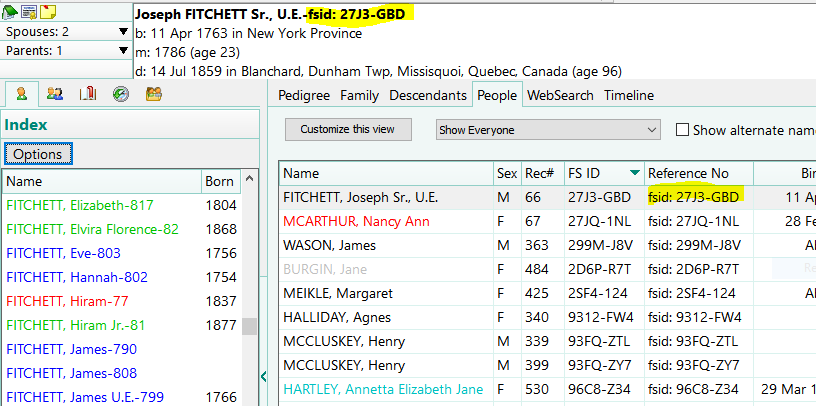
REFN_CopyFSID.sql.PNG
Sample of database after script has run to copy the FamilySearch ID into the first Ref# fact for each person for those persons having been matched to FamilySearch.

Download Script

REFN_CopyFSID.sql for RM versions before RM8

REFN_CopyFSID-RM9 for RM versions after RM7 (tested on a RM9 database) 2023-11-22

Description

Creates a Ref# fact containing the FamilySearch ID for each person in the database matched to a person on FamilySearch Family Tree in the format “fsid: XXXX-XXX”. This enables the Duplicate Search Merge (DSM) option “Find people with the same reference numbers (and ignore everything else)” to pair up people with the same FSID Ref#.

This script shuffles existing Ref# facts to follow the FSID Ref# facts it creates by copying the former out to a temp fable xRefnBak, deleting the originals from the EventTable and then appending them after the FSID Ref# facts are created.

The script also preserves and pushes to the front existing FSID Ref# facts for a person not currently matched in the database to Family Search, i.e., the FSID has been somehow lost or the fact was manually added. This feature is of uncertain value.

A temporary table xRefnBak is created by the script and is deleted when the SQLite manager closes the database.

Requirements & Caveats

Requires the REGEXP extension which is not included in all SQLite managers; SQLiteSpy does support it.

N.B.: the script assumes there are no sources, media, or any other element attached to the existing Ref# facts and makes no attempt to preserve those linkages nor to delete the records in the corresponding tables. It is possible that some will become erroneously attached to new FSID Ref# facts.

Discussions & comments from Wikispaces site

gualco

REGEXP error

gualco
05 September 2016 23:03:56

Thank you so much for this script!!!

I tried using it and got an error. I’m wondering if I am just using it incorrectly–does it need to be run in pieces? do I need a different SQL app? etc.

When I try to run this script, I get this error:

no such function: REGEXP.

This is what I did:
1. Open SQLite Expert Personal 4.2.0.693 (x86)
2. Open my RootsMagic DB file within SQLite
3. Click on the EventTable in the left sidebar
4. Click on the SQL tab and paste in the script
5. Click the “Execute SQL” button
6. Error pops up

Gina


ve3meo

ve3meo
06 September 2016 00:13:54

Hi Gina, use SQLiteSpy. It supports REGEXP.

Tom

Reports, Narrative, Jerry Bryan Trick #reports

Rev 2016-08-16
This is an extension of DummyFamily-Add.sql described below with added constraints so that the trick is applied only to those childless, spouseless persons having events other than Birth or Death or more than two of those or BD events with notes or having a General Note or an Alternate Name. Requested by wiki member aefgen in the hope that it would reduce the number of instances of “excessive white space”, a collateral consequence of the trick.
DummyFamily-Add2.sql rev 2016-08-20 added having a General Note or an Alternate Name


These two queries carry out the trick first reported by Jerry Bryan in the RootsMagic Forums in the topic Register Style Reports, Individuals Without Children or Spouses.

DummyFamily-Add.sql

/* DummyFamily-Add.sql
Based on trick developed by Jerry Bryan to cause Narrative Descendant reports
to output childless, spouseless children in their own generation, along with their
married or parental siblings.
 
Adds dummy family(ies) for this(all such) child(ren), based on the runtime parameter,
to the FamilyTable. Requires SQLite Export Personal or equiv to support selection of a single
child.
 
After completing the report, run DummyFamily-Delete.sql; it is probably less risky, however,
to run the first query and report on a copy of the database and then delete the copy.
2012-01-15 ve3meo
*/
 
INSERT INTO FamilyTable
 (FatherID)
SELECT ChildTable.ChildID FROM ChildTable
WHERE
 CASE
  WHEN @RIN NOT LIKE '' THEN ChildTable.ChildID = @RIN
  ELSE 1
 END
AND
 ChildTable.ChildID NOT IN (SELECT FatherID FROM FamilyTable)
AND
 ChildTable.ChildID NOT IN (SELECT MotherID FROM FamilyTable)
;

DummyFamily-Delete.sql

/* DummyFamily-Delete.sql
Reverses the changes made by DummyFamily-Add.sql to the FamilyTable.
 
After completing the report, run DummyFamily-Delete.sql; it is probably less risky, however,
to run the first query and report on a copy of the database and then delete the copy.
2012-01-15 ve3meo
*/
 
DELETE FROM FamilyTable
WHERE
 FatherID
 IN
  (
   SELECT FatherID FROM FamilyTable
   WHERE
    CASE
     WHEN @RIN NOT LIKE '' THEN FatherID = @RIN
     ELSE 1
    END
   AND
    MotherID IS NULL
   AND
    ChildID IS NULL
  )
;

Discussions & comments from Wikispaces site

aefgen

Re: Dummy Family Add script (“Jerry Bryan trick”)

aefgen
16 August 2016 21:29:35

Tom, thanks – on first examination, this revision definitely improves the report greatly. The choice of which individuals to carry forward to the next generation and which to keep under the parents works well and eliminates much but not all of the excess white space. I will look more carefully tomorrow and see if it might be tweaked further. One problem was that on trying to backup the file, RM said it encountered an error, and when I then used the database tool to check the file integrity, it gave me an SQ Lite error 1 – no such collation sequence: RMNOCASE. The program then froze and I had to use task manager to stop RM. But when I went back in and ran the database tools, they reported that all was well, and I was then able to backup the file. We’ll see if that happens again. – Alex


thejerrybryan

thejerrybryan
20 August 2016 00:18:32

The reports that I post process are usually 50 to 60 pages, so the scale is not quite so grand as yours. Nevertheless, I try to do as much of the cleanup as possible with global replaces. If you want to go that route, you will have to play with it to see what works for your needs and what doesn’t. I usually try to do the global replaces in a text editor, processing the RTF file produced by RM before it has been touched by Microsoft Word. That requires learning a little bit about RTF tags. The other approach (and sometimes I do both) is to do the global replaces from within Microsoft Word. You have to turn on Word’s equivalent of what WordPerfect used to call “Reveal Codes” to expose white space characters to global replace. It’s tricky business, either with a text editor or with Word, but if you can figure out what meets your needs you can save a huge amount of time with global replaces. In case you want to try the RTF file plus text editor option, I wouldn’t recommend Notepad for a file that big. I would recommend Notepad++ instead – a very powerful and free text editor.

On your other questions, I really haven’t looked at them. What you are doing seems much fancier than what I do, and I have to admit that I don’t use Tom’s script. I still do it kind of manually where I add dummy children to anybody I want to force into the next generation in a narrative report. I leave such dummy children in my production database at all times and when I’m preparing a report for a family reunion I copy my production database into a reporting database that I can manipulate as necessary to produce the report. I use File->Copy, not Drag-and_Drop or GEDCOM Export/Import to make the copy. Then, I have an SQLite script that essentially deletes the dummy children without also deleting the FamilyTable entries for the parent of the dummy children. You can’t do the delete of dummy children that I’m talking about from within RM itself because RM is smart enough to also delete the FamilyTable entry for the person to be carried into the next generation, and using the FamilyTable entries to carry the person into the next generation is the whole point of the exercise. So my delete of the dummy children is an incomplete delete which is exactly what is needed. But I’m afraid that my rather manual technique doesn’t scale up very well to your use case. That’s part of the reason that Tom wrote his script.

Jerry